
Python 2.7 Windows Installation Checklist
Installing Python on Windows is a bit more laborious than on Mac or Linux, because there's a bit of manual configuring to do. Here's an installation checklist to go through to get it done so that you have IPython ready, and you can install packages from PyPI. These instructions are for Python 2.7.
1. Python
Download the Python 2.7 Windows Installer from the Python.org download page. Choose either 32-bit or 64-bit version. Install it. Take note where you install it.
2. PyWin32
Download Python for Windows extensions or "pywin32" here. Install it. It should detect your Python directory. This is optional, but I recommend it.
3. Setuptools
Download setuptools from PyPi
- For a 32-bit installation, you can use the setuptools-x.y-win32-py2.7.exe file. Run the installation program, which should detect your installation path.
- For a 64-bit installation, download the ez_setup.py and place it in your installation directory.
4. Your PATH
Edit your PATH. Open My Computer properties, from there Advanced Settings, and open the Environment Variables property window. If you have a PATH variable set already, edit that. Otherwise add an environment variable called "PATH" and add your Python installation directory, and also the scripts directory. The paths are separated by semicolons. For example:
C:Python27;C:Python27Scripts;C:Python27ToolsScripts
Here's a screenshot:
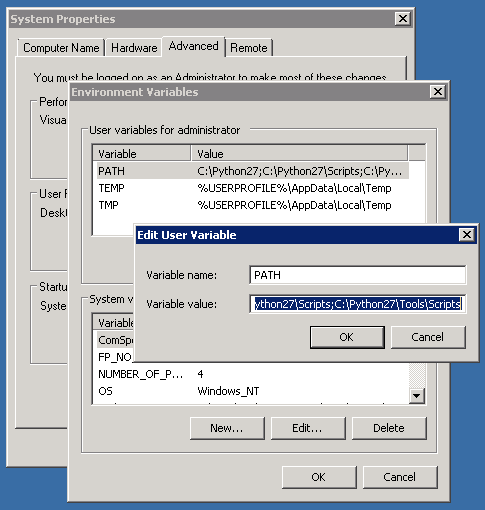
If you need other users, or system services to use Python, you can add it to the System Path. If you only use it yourself, add it to your own path.
5. IPython
Open command prompt. Go to the installation folder you chose.
c:
cd \
cd Python27
If you are using the 64-bit version, now is the time to run the ez_setup.py which you downloaded earlier. The defaults are pretty much ok. If you have the 32-bit version, the setuptools should be installed already, so move on.
You can install stuff from the the Python Package Index using the easy_install command, which is in the Scripts folder. If you added it into your path, you can run it from anywhere.
To get a nicer shell, let's install IPython. Run these commands (which were taken from this page):
easy_install distribute
easy_install pyreadline
easy_install ipython
Now you can start the IPython shell by running the ipython command:
C:\Python27>ipython
Python 2.7.3 (default, Apr 10 2012, 23:31:26) [MSC v.1500 32 bit (Intel)]
Type "copyright", "credits" or "license" for more information.

IPython 0.13.1 -- An enhanced Interactive Python.
?         -> Introduction and overview of IPython's features.
%quickref -> Quick reference.
help      -> Python's own help system.
object?   -> Details about 'object', use 'object??' for extra details.

In [1]:
Also, to get packages and libraries, just run easy_install to fetch and install it automatically.
If you create your own modules and packages, you can put them in this directory:
C:Python27Libsite-packages
That way you can import them in your scripts easily.
Comments
💬 Leave a comment